

Marketing Reporting That Starts With Customers, Not Charts
SEO reporting should answer one question before any other: how many real customers did this bring in? Every month, TESSA sends a report that leads with the calls and form entries from real people, shows where each one came from and, when your CRM is connected, shows the jobs you closed. Rankings, traffic and AI search are in there too, as the explanation behind the number, never in place of it.
Rated 5.0 out of 5 by our clients · Serving clients since 2012 · 2026 Vega Gold Award
Why Most Agency Reports Leave You Guessing
If you have ever opened a report, seen rankings up and traffic up, and still not known whether the phone rang more, you already understand the problem. Rankings and sessions are easy to show and easy to inflate. The number that pays your bills is the number of people who wanted to hire you, and most reports never get there.
We wrote a guide to what any marketing agency report should include. This page shows what ours actually looks like, tab by tab, and how each number gets checked before you see it.
What Each SEO Report Covers
Each report is an interactive page with a tab for every question an owner asks. A tab that does not apply to your business, such as paid ads when you do not run them, is left out, so you never scroll past an empty chart.
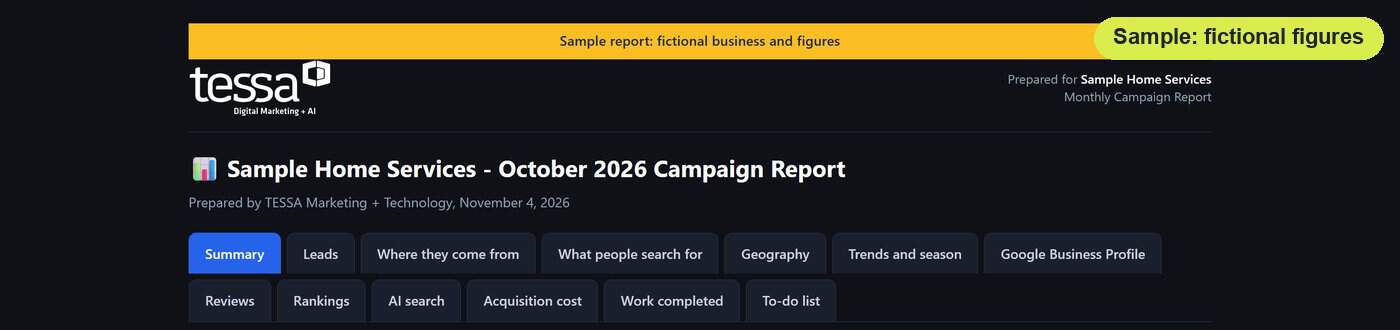
Summary
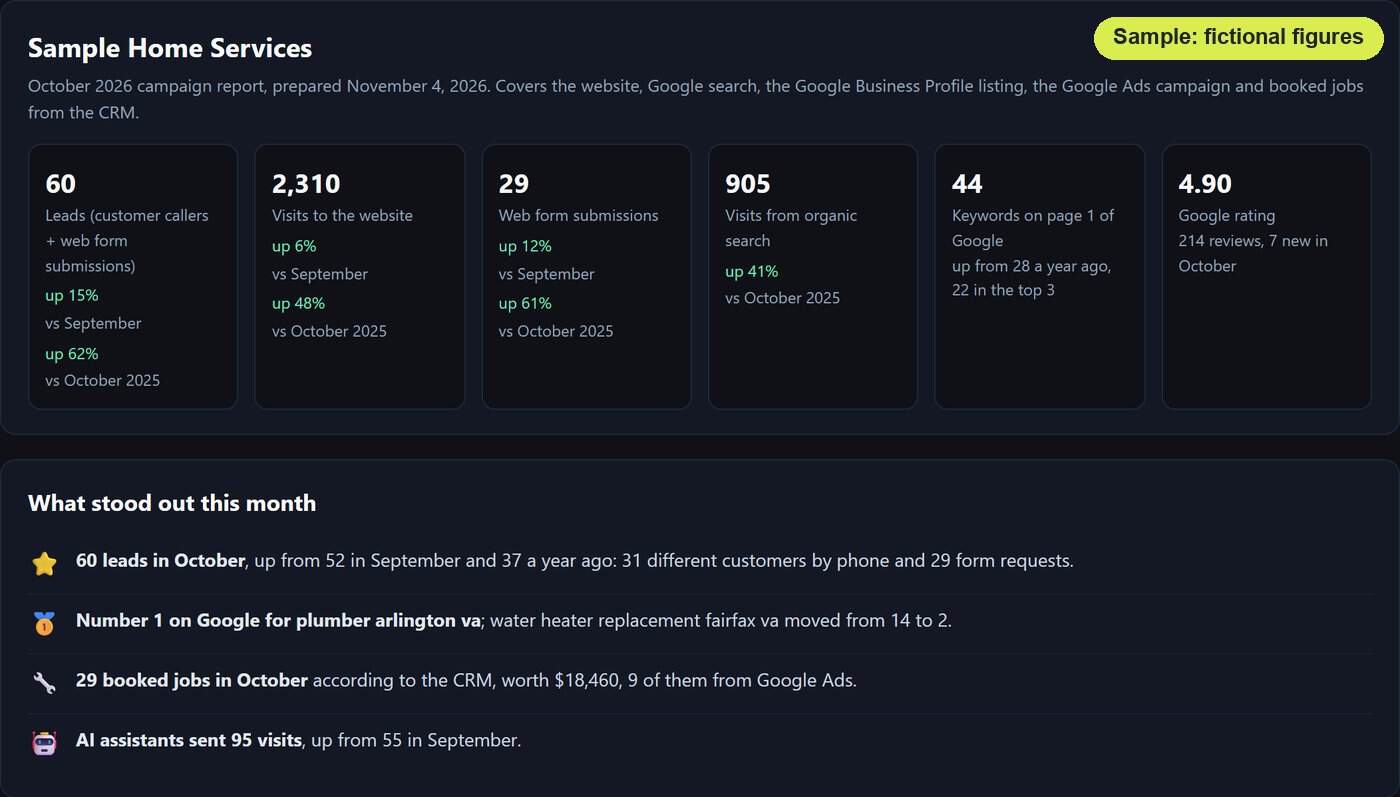
The month in plain English: what came in, what moved, and what we are doing about it.
Leads
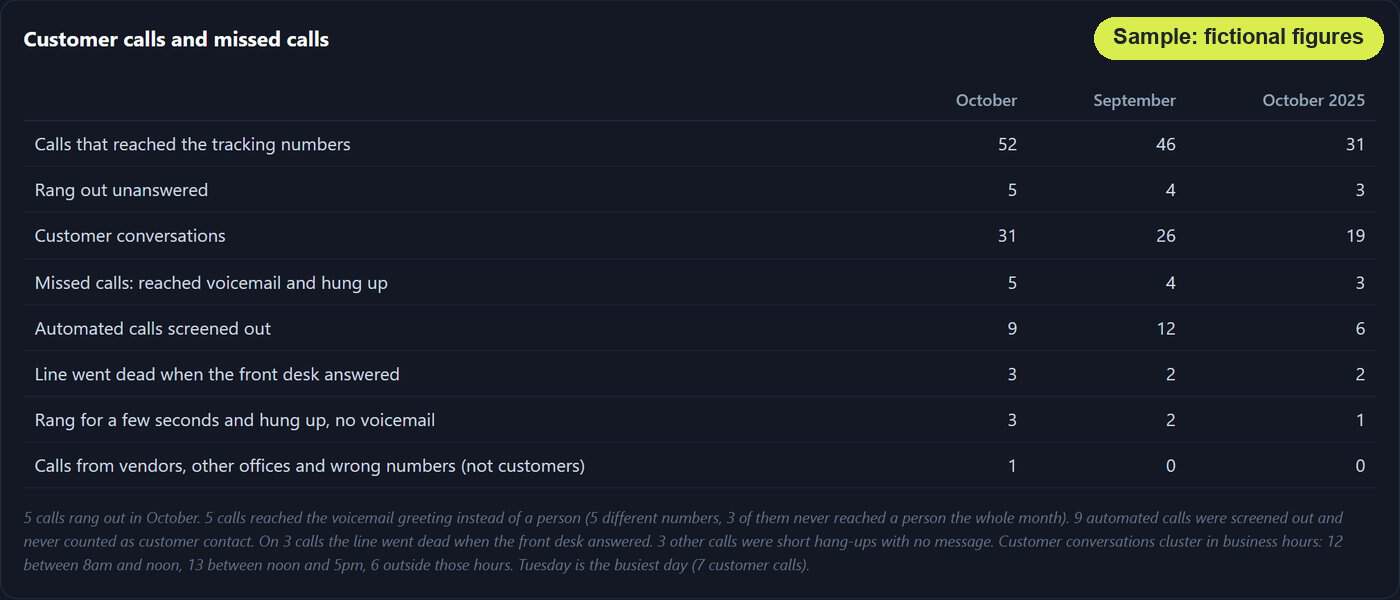
How many real people called or wrote, with robocalls and repeat callers taken out where we track your calls.
Where they come from
Which channel each lead arrived through, so you can see which part of your marketing is doing the work.
What people search for
The words customers typed before they found you, so you know which services are pulling demand.
Geography
Where your visitors are, town by town, so you can see whether the areas you want are finding you.
Trends and season
Whether this month is normal for the time of year or a real change, so one slow week is never read as a crisis.
Google Business Profile and reviews
How your Google listing performed month over month, plus new reviews and your rating, listing by listing.
Rankings
Where you stand for the terms tied to revenue, measured only on the days you are open.
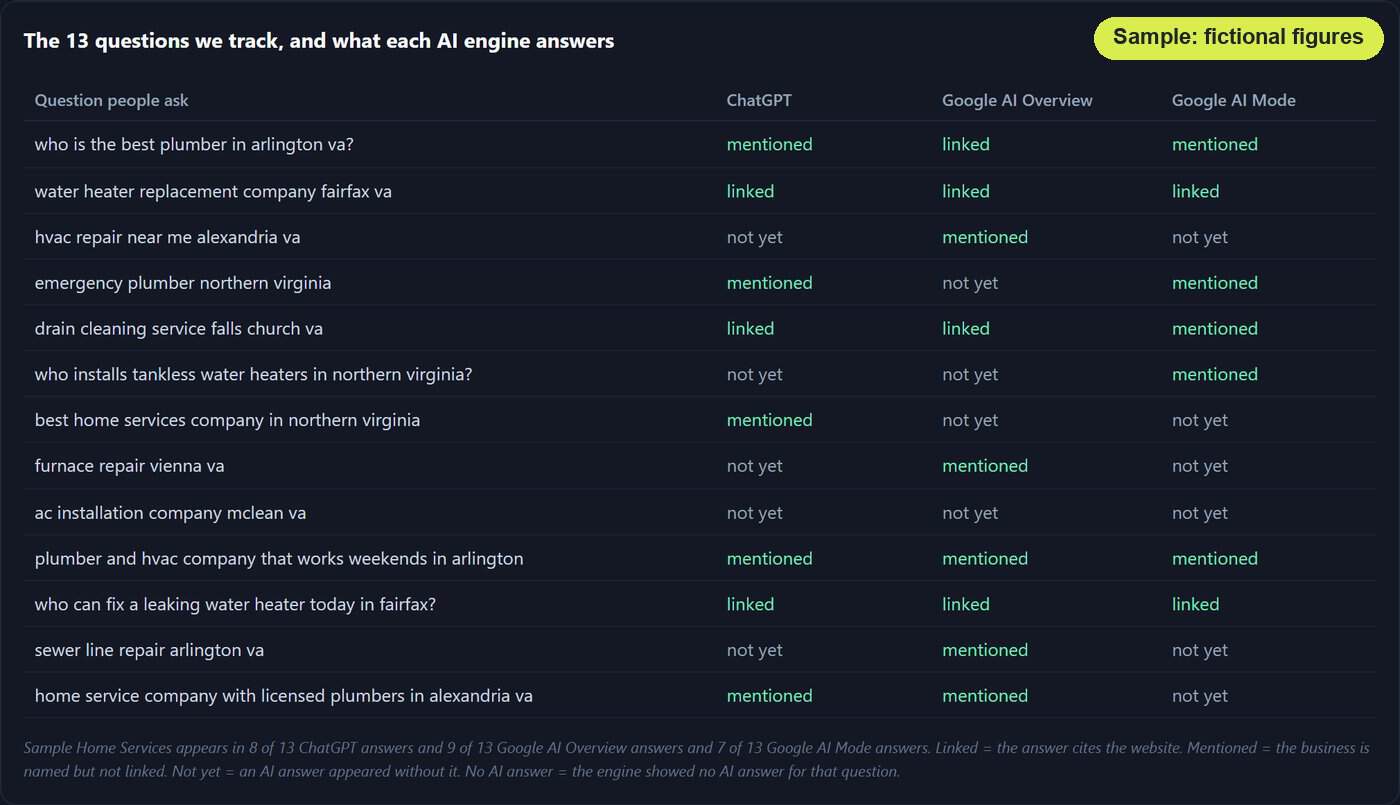
AI search
Whether ChatGPT, Google AI Overviews and AI Mode, Perplexity and Gemini name your business for the questions we track, with Claude and fact checks added where we set them up.
Acquisition cost
Where we track your campaign costs, what each lead costs, month by month.
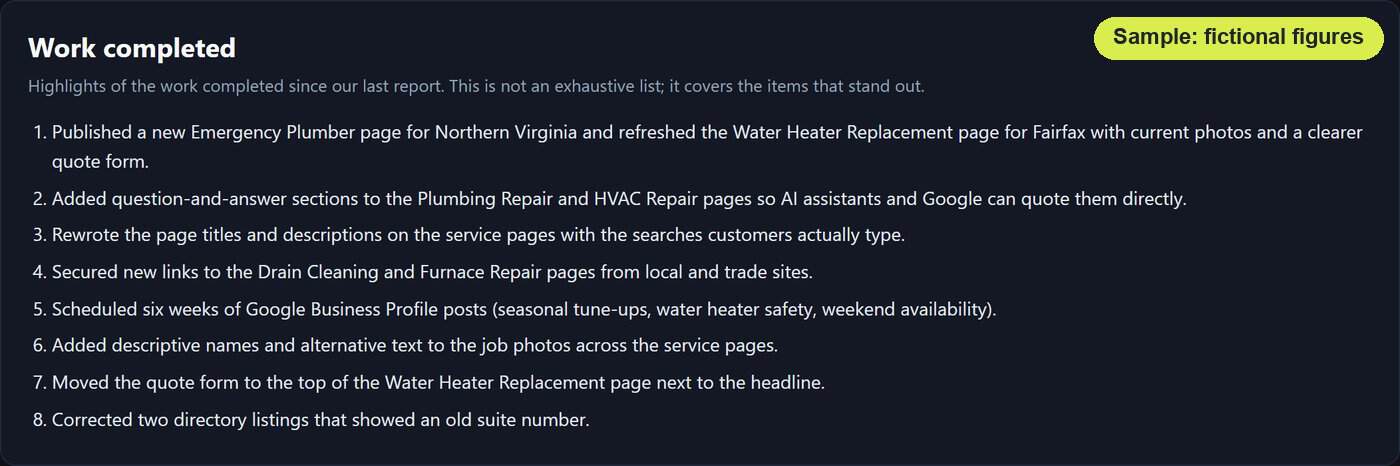
Work completed
The highlights of what we did since the last report, drawn from our own work records, not from memory.
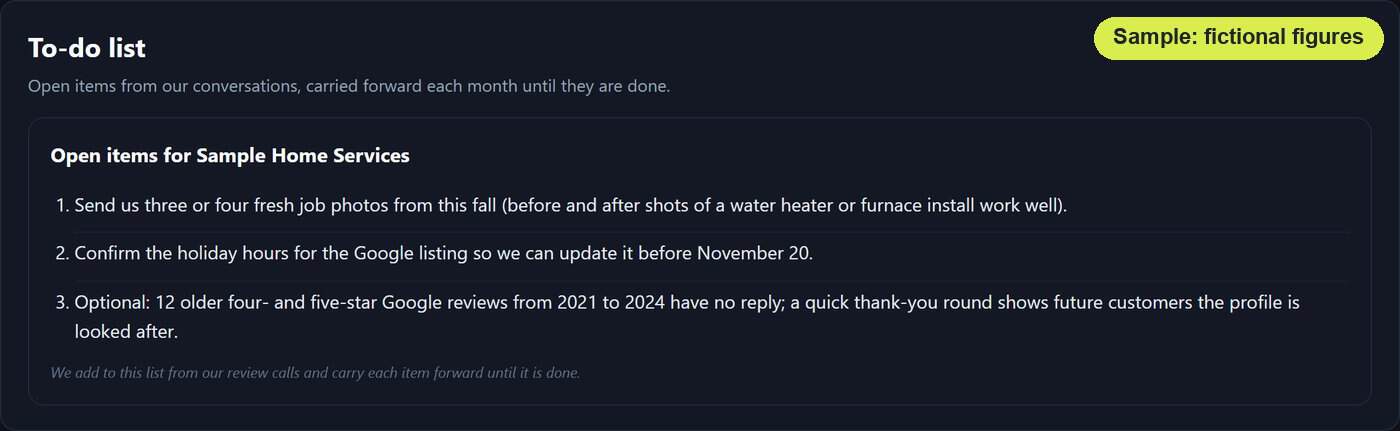
To-do list
What we need from you, carried forward every month until it is done.
How a TESSA Report Gets Made
Automation does the pulling and the arithmetic. People do the judging. Every report goes through the same five steps before it reaches you.
1. The data comes straight from the source
We pull from Google Search Console, Google Analytics 4, your Google Business Profile, keyword rank tracking and, where you have them, call tracking and Google Ads. If a source does not answer, the pull is retried and we are alerted the same day, and the report is rebuilt before it goes out or says plainly what is missing.
2. Leads are screened
Where we track your calls, robocalls, calls with no message and repeat callers are taken out. Where your website keeps its own log of form entries, each one is read, and sales pitches and bots come out. What is left is the number of real people who wanted to do business with you. The full definition is below.
3. Every number is checked against the data
Each figure in the written summary is tested against the source data before the report is put together, so the summary and the charts tell the same story. A decline gets a “why it moved” reason only when the evidence proves it. If we cannot prove the cause, we do not guess. Rankings come only from days your business is open, and keyword drops are checked for rank-tracker glitches before they are reported.
4. An independent check
Before a report reaches your account manager, a separate AI reviewer and a set of fixed checks go through it against the data and last month’s edition, looking for problems such as an unexplained drop, a comparison against a partial month or a figure that disagrees with the last report. A problem they confirm holds the report until it is fixed. Then your account manager reads it before it goes out.
5. It lands in your inbox
You get an unlisted link that search engines do not index, plus an attached copy for your files. A printable version is available on request for in-person meetings, so you can hand the report to a partner or a board without opening a laptop.
Leads You Can Trust
Raw call counts and form totals flatter everyone. Robocalls, hang-ups, pitches from other vendors and the same customer calling three times all look like leads on a dashboard. None of them are.
Here is what a lead means in a TESSA report:
- Calls: where we track your calls, screened for robocalls, calls with no message and repeat callers.
- Forms: where your website keeps its own log of form entries, screened for sales pitches and bots.
- One person, one lead: in those screened calls and forms, someone who gets in touch twice counts once.
The lead figure you see is the number of real people who called or wrote. That is the number we track month over month, and the one every other tab exists to explain.
Connect Your CRM and See Jobs, Not Just Leads
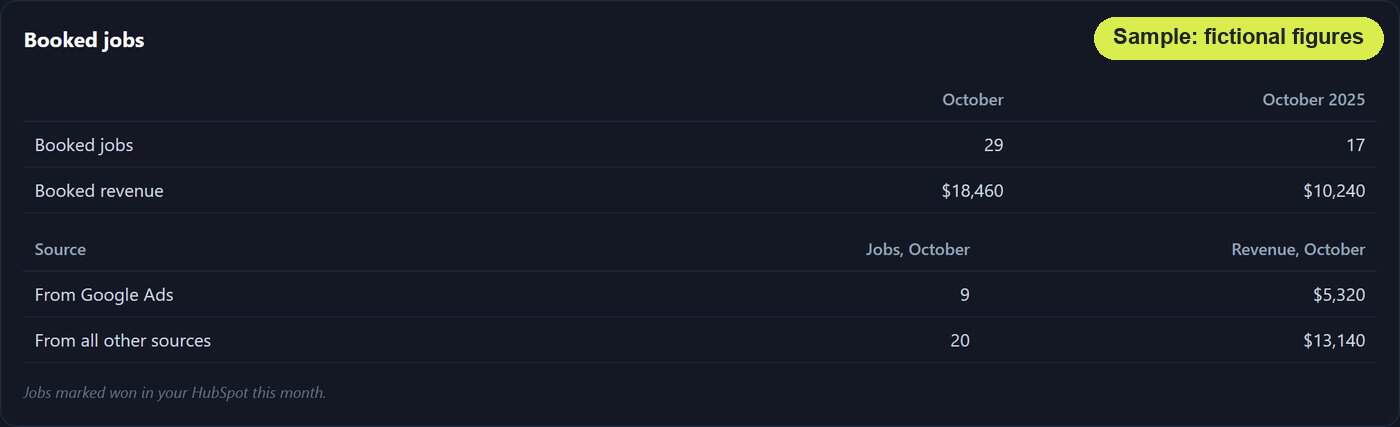
A lead is a good start. A closed job is the point. Connect your CRM and the report shows the jobs you closed beside each month’s leads.
We connect to HubSpot today, and other CRMs with an API can be connected during setup. The HubSpot connection is read-only, so nothing in your CRM is changed. The report itself shows totals only: no customer names, phone numbers or email addresses appear in it.
What the connection unlocks
- Closed jobs, split by source. See how many jobs came from Google Ads and how many from everything else, not just how many inquiries.
- Revenue, if you want it. Turn the optional revenue figure on and the report shows what those jobs were worth.
- Outcomes recorded in Google Ads. A daily upload can tell Google Ads which ad clicks became deals in your CRM and which of those closed, with the job value, so your ads account sees real outcomes. Matching uses Google’s click ID, or an email or phone number that is hashed (scrambled one way) before it is sent.
We already run the HubSpot connection and the Google Ads upload for a client today. It is not a roadmap item.
Is AI Recommending You? The Report Knows
A growing number of customers ask an AI assistant for a recommendation before they see a single link. Standard analytics cannot tell you whether you were the recommendation.
The AI search tab can. It shows whether ChatGPT, Google AI Overviews and AI Mode, Perplexity and Gemini name or link your business for the questions we track for you. Where we set them up, Claude is added to that list, and the answers are checked against a facts sheet we agree with you, so a wrong service claim gets flagged. The tab also counts the visitors AI assistants send to your site and, where Search Console reports them, the impressions Google credits to AI features. Where our site tracking is installed, it even counts the times an AI assistant opens your pages live to answer someone, visits that standard analytics never sees.
If the answer today is “not yet”, that is where our generative engine optimization work begins, and this tab is how you will watch it change.
You Always Know What We Did and What We Need
Work completed
The highlights of what we finished for your monthly SEO program since the last report, drawn automatically from our own work records.
To-do list
The items we need from you (a login, a photo, an answer, an approval) carried forward each month until they are done. If something is holding the work up, you will see it here.
SEO Reporting FAQs
How often do I get a report?
Monthly, on a set day. The report is drafted automatically from the source data, then a person reviews it before it is sent. You get the same format every month, so this month is always easy to read against the last one.
Do I have to log in to a dashboard?
No. Each report opens from an unlisted link that search engines do not index, and a copy is attached to the email for your files. There is nothing to install and no password to remember.
Which CRMs can you connect?
We connect to HubSpot today. Other CRMs with an API can be connected during setup. The HubSpot connection is read-only.
What does the CRM connection show in my report?
Totals only: the number of closed-won jobs, split between Google Ads and your other sources, and their revenue if you turn that on. No customer names, phone numbers or email addresses appear in any report, and because the HubSpot connection is read-only, nothing in your CRM is changed.
What counts as a lead?
A real person who called or wrote because they wanted what you sell. Where we track your calls, robocalls, calls with no message and repeat callers are taken out. Where your website keeps its own log of form entries, sales pitches and bots are taken out too, and a person who writes twice counts once.
What happens when a number drops?
We tell you why only when the data proves it, and we do not guess. Keyword drops are checked for rank-tracker glitches first, and rankings are measured only on days your business is open, so a closed Sunday never shows up as a lost position.
Can I print it?
Yes. A printable version is available on request for in-person meetings, so marketing reporting can go on the table in front of a partner or a board without a screen.
See the Report Before You See a Proposal
Open the sample, click through the tabs, and decide whether this is the report you have been asking your agency for. Then talk to us about getting one with your numbers in it.


